

Antivirus Removal Tool 2026.02 (v 1) | Size: 228.96 MB
Language: English
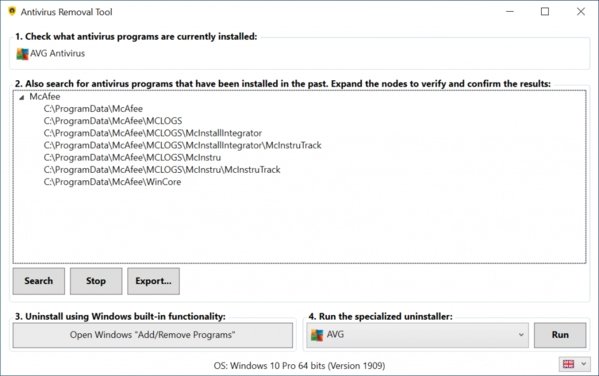
Antivirus Removal Tool is designed to detect and completely remove antivirus software. It will help you to identify current and past installations, and it will provide you with the official specialized uninstallers. These are designed by the manufacturers of the antivirus programs to completely delete all files, drivers, services, and registry records left behind by the programs they produce.
Here are some scenarios where this tool will be useful
– You want to install a new antivirus, but in order to avoid possible conflicts, you want to remove as thoroughly as possible the one that is currently installed, as well as the leftovers of any others that had been installed in the past.
– The regular uninstall failed, and you are left with a broken system.
– The regular uninstall completed, but you are now having problems related to the antivirus you have just removed.
– Your computer is having problems because it has two or more antivirus programs installed and active, and you are unable to completely remove them.
Antivirus Removal Tool is divided in 4 sections
1 – Identify the currently installed antivirus programs.
2 – Search for leftovers of past installations of antivirus programs.
3 – Uninstall using Windows built-in functionality.
4 – Run the specialized uninstaller provided by the manufacturer.
Here is a more detailed description of the program features
– Identifies the currently installed antivirus program(s).
– Helps in identifying past installations of antivirus programs, by searching the system for leftover folders of several common solutions. The results are conveniently presented in tree views, grouped by the name of the antivirus / manufacturer found. You can right-click the paths and open them in file explorer to check its contents.
– Ability to generate a report containing the computer serial number, operating system, current and past installations of antivirus products.
– Provides 1-click access to Windows “Add / Remove Programs”. From there you can uninstall the antivirus using the regular uninstaller. Whenever is available, the regular uninstaller should always be used in the first place.
– Provides the official specialized uninstallers for 29 antivirus programs. These are handily presented in a combobox and can be executed with the click of a button.
– Multi-language support: Chinese (simplified), French, German, Italian, Portuguese, Russian, Spanish, English.
– Frequently updated: as a rule of thumb this program will be updated once every month, but it can also be updated more frequently whenever is necessary. It will automatically check for the existence of an updated version when it starts.
Requirements: Windows 7 through Windows 10.
HOMEPAGE:
antivirus-removal-tool.com/
rapidgator.net/file/936f1875286cf1233ce6040930da6943/Antivirus_Removal_Tool_2026.02_v.1.zip
nitroflare.com/view/EEFCABEE45BA298/Antivirus_Removal_Tool_2026.02_v.1.zip
