

WDAC Lockdown 1.46 | Size: 29.57 MB
Language: English
WDAC is a security feature in Windows that can filter the applications allowed to run code on the local system. Only user-authorized software can execute code while the WDAC service is running, which turns it into a whitelist-based filter for the operating system. Aiming to streamline the easier management of WDAC and enhance its default functionality, WDAC Lockdown provides a means for the user to create customized whitelist policies and configurations, while also providing additional security-oriented features.
Build custom WDAC policies to match your needs and profile
The purpose of WDAC Lockdown is to help you create a WDAC policy that caters to your user profile and your requirements.
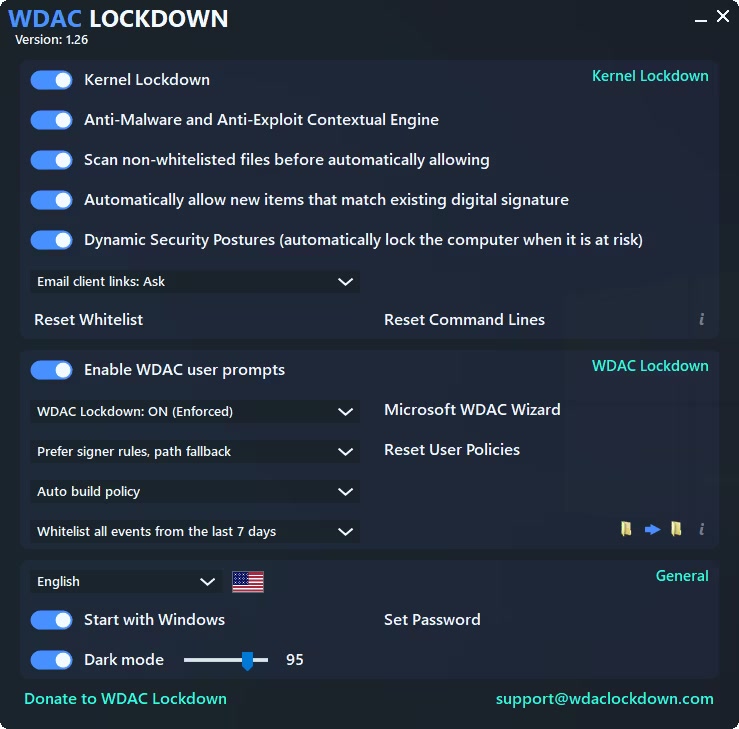
Upon launch, WDAC Lockdown is disabled by default, and you are recommended to run it in training mode for a limited period of time, then turn it on. This mode allows the application to learn your habits and memorize the new events you allowed, thus helping to build the most personalized WDAC policy suitable for you and your system.
To put it another way, once you train WDAC Lockdown, this application can practically automate WDAC to allow all the new events from the training period. You can whitelist all the events that occurred in the last days and even use the integrated policy wizard to create new policies, both base and supplemental ones.
If you need to start over, then you can reset all the WDAC user policies to defaults with the click of a button.
Get anti-malware items in the context menu and other security-related functions
WDAC Lockdown comes with a few features that are meant to enhance WDAC’s functionality. The kernel lockdown feature automatically blocks a list of potentially dangerous file types, including scripts.
For your convenience, WDAC Lockdown can add an anti-malware and anti-exploit item in the Windows context menu to quickly scan a file and create exclusions. Moreover, you can configure WDAC Lockdown to analyze files that are not whitelisted before automatically allowing their execution. WDAC Lockdown also features automatic computer locking when the computer is most exposed to risks and threats, meaning when the user is browsing the web or checking their email.
Automation and customization tool for WDAC
WDAC Lockdown changes the way you interact with the Windows Defender Application Control, this security feature of Windows. Not only that it allows you to create customized policies, but it also implements a few extra functions meant to improve the security of your system.
Whats New
Updates: official site does not provide any info about changes in this version
HOMEPAGE:
cyberlock.tech/wdaclockdown.html
rapidgator.net/file/9159b6de082f7159979a1ebe2ce0e6ba/WDAC_Lockdown_1.46.rar
nitroflare.com/view/3DCB72F819A8402/WDAC_Lockdown_1.46.rar
