

Windows 11 Debloater 2.1.1 | Size: 1.78 MB
Language: English
Customize your Windows 11 environment by disabling certain features and enabling others, then generating a PowerShell script to run and apply the changes.
Microsoft delivers Windows 11 with a predefined set off functions, features and applications in a configuration that cannot be easily overridden. But every problem has its fix and developers started to create applications such as Windows 11 Debloater to help anyone who installs Windows 11 customize their working environment as they consider fit.
Windows 11 Debloater helps you uninstall and remove Widows functionality that you do not use or need, while also allowing you to uninstall applications, change telemetry and privacy settings, change the context menu, and so on. In other words, you can use it to fully personalize and enhance your user experience.
Essential privacy-oriented tweaks
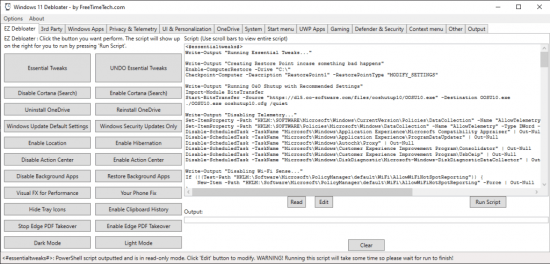
There is no need to install Windows 11 Debloater, as it can be easily launched just by double-clicking on the main executable. You are greeted by a multi-tab interface that facilitates one-click access to all the options without having to browse through extensive menus.
The so-called EZ Debloater is a tool that can change the default Windows settings. What will probably pop up is the “Essential Tweaks” button, which you should not be afraid to push. Why? Because it does not actually apply the tweaks, but it allows you to view the content of a PowerShell script that can apply the changes when executed.
The essential tweaks include disabling telemetry settings, Wi-Fi Sense, Activity History, Location Tracking, automatic Maps updates and location, Feedback, Tailored Experiences, Advertising ID, Tracking Services, Error reporting, Remote Assistance, and other such options that might share personal data, activity and user habits with Microsoft and other third-party entities.
The EZ Debloater can also disable Cortana or background apps and stop Microsoft Edge from being the default PDF app.
Personalize your working environment
All the other tabs in Windows 11 Debloater allow you to carry out various customization tasks. You can install multiple third-party applications, disable or enable Windows default apps, and change other privacy-related settings.
As for personalization, this application allows you to get back the Windows 10 file explorer, reveal file extensions, disable Snap Assist and other such features, configure taskbar behavior, deactivate aero shaking, and so on.
While easy to use, it targets experienced users
Windows 11 Debloater is a handy tool to have around to customize your Windows 11 PC, but please make sure you create a restore point and a data backup before doing so, just to be on the safe side of things. While it is intuitive and easy to use, it does alter the default Windows features and, therefore, it is advisable you know what you are doing when applying the changes.
rapidgator.net/file/ce2e2aa65a9b8f9179ef1ef6569b38ca/Windows_11_Debloater_2.1.1.zip
nitroflare.com/view/4120431835B9FF2/Windows_11_Debloater_2.1.1.zip
